Showing posts with label customer engagement. Show all posts

Saturday, 22 August 2015

Why making your readers cry will improve your content marketing

The role of content marketing is to elicit a response from the reader - we want them to behave differently - to switch brands; to try a new service; to talk about us with their family and friends.


The first step in encouraging people to behave differently is to challenge them to start thinking differently - to re-educate; view things in a new way; understand a different perspective - and this in itself can be challenging.


This is where understanding the relationship between emotions and behaviour really comes into play.


Emotion drives action


You share a video with your friends because it makes you laugh; scares you; makes you cry; reminds you of a personal experience. Emotions provide us with feedback that tells us how to react in the present, based on our past experiences.


So whether it’s in personal or professional communication, eliciting an emotional response from people will encourage them to share your content.


Just as importantly, it is also proven to help them remember its key messages more vividly - in the same way that listening to a particular song can instantly transport you to a place and time significant in your past.


This approach, of using emotion to drive action, is illustrated well in the recent shift of approach used by social marketers. Success for a social marketer comes not from selling a product or service, but in proving that they have been able to change people’s behaviour by challenging the way they think.


Out is the content instructing people to stop smoking; drink less; and exercise more - in is the content which encourages people to change by eliciting a ‘what’s in it for me’ emotional response. This advert by Sussex Safer Roads being a powerful example:


Eliciting the right emotional response


Psychologist Robert Plutchik identified eight primary emotions which content marketing professionals can use as a guide when considering the appropriate emotion to elicit from the reader: Joy, Trust, Fear, Surprise, Sadness, Anticipation, Anger, and Disgust.
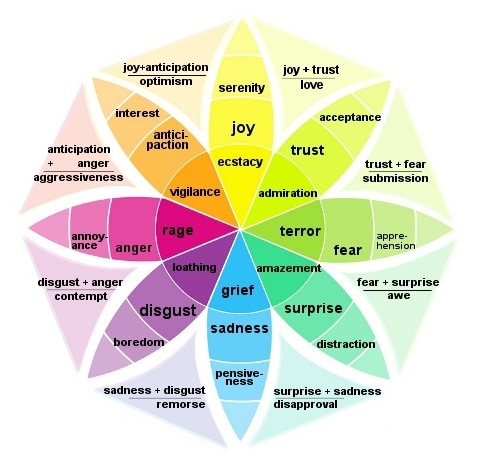

Image source: www.synchronicitymarketing.com


The appropriate emotion to target will depend heavily on the product or service being promoted, and the demographics of the target audience. Look at this example from our social marketing friends, encouraging smokers to quit, not by tapping into the fear emotion, but the trust a child places in adults to care for their physical and emotional wellbeing:


Emotional responses can be tapped at different points within your content, and to varying degrees, for example in:


  • an emotive email subject line
  • unexpected video content
  • social media conversation starters.


So, at the start of your next marketing campaign, remember to ask yourself how your reader should feel before, during, and after accessing your content.

About the author

Claire Cresswell-Lane is a UK based, CIM Chartered Marketer specialising in digital marketing strategy and communications. You can contact her via LinkedIn or Twitter.
Thursday, 20 August 2015

Catering for a range of learning styles with your content marketing

Buyers conduct extensive online research before making large or important purchases, and this is especially true of financial products and services. But understanding financial products and services can be difficult for the lay person.

Financial organisations have role in educating visitors about the range of products and services on offer, and a responsibility to educate as to which is the most likely to suit their personal circumstances.

This post illustrates how financial organisations are starting to present information in formats that cater for a range of learning styles - something that other sectors should sit up and take notice of.


“Don’t create another monotonous, bland and (worst of all) overwhelming financial services product page. Take the time to bring the relevant content above the fold in an innovative way….like videos and iconography.” Maxymiser, 2014


Content marketing that caters for a range of learning styles [Share on Twitter]


Auditory learners enjoy accessing information through listening and like content presented in formats such as checklists. Podcasts are frequently used by reputable publishers such as The Financial Times to cater for this style of learner:


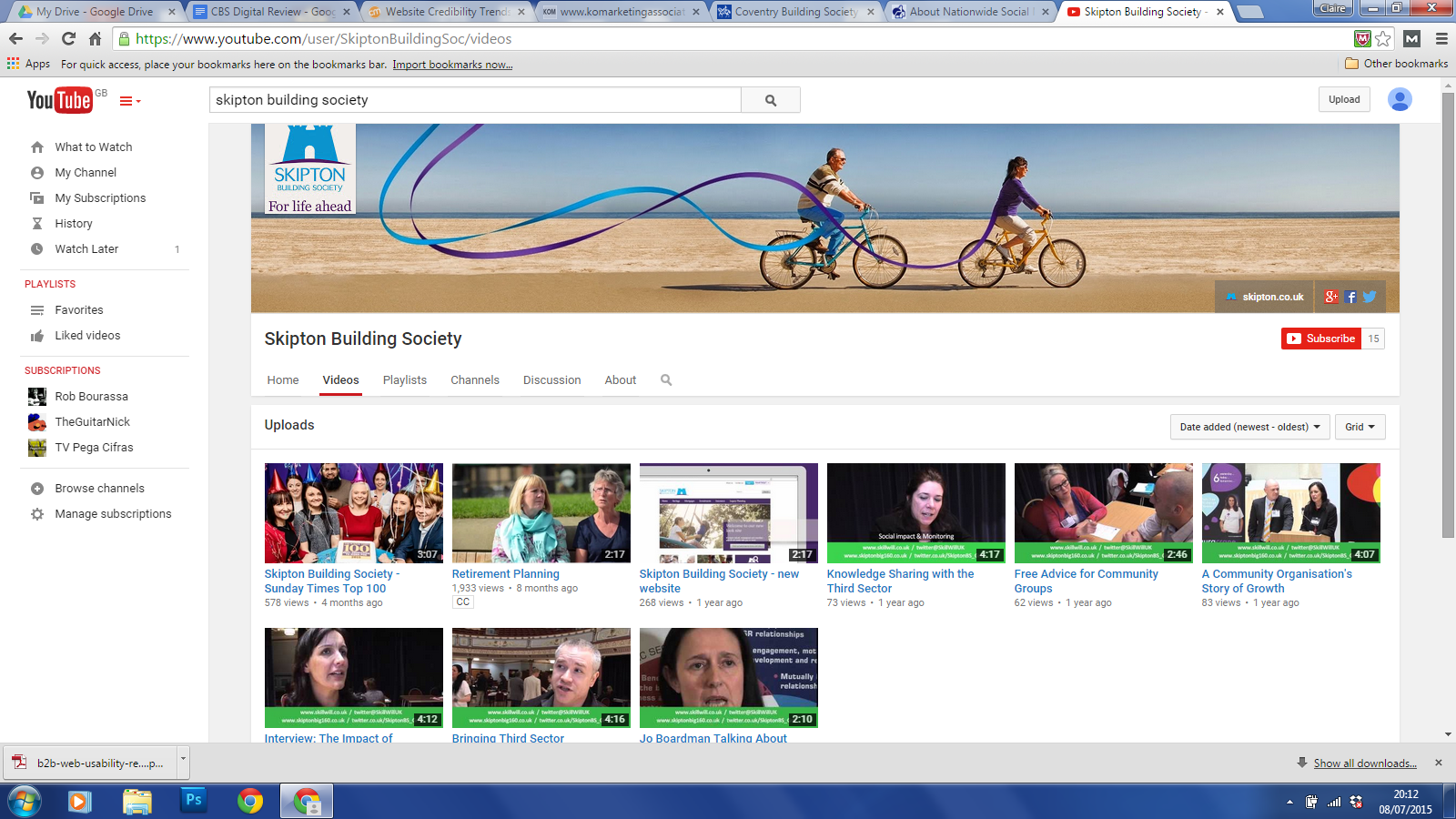
Visual learners, as the name suggests, benefit most from pictures and video. They are likely to want to learn about all the options available before deciding which is right for them. Many financial organisations, such as Skipton Building Society have YouTube channels which they use to educate visitors about a range of topics including help to manage finances; product demonstrations and guides; Corporate Social Responsibility activities, and so on:


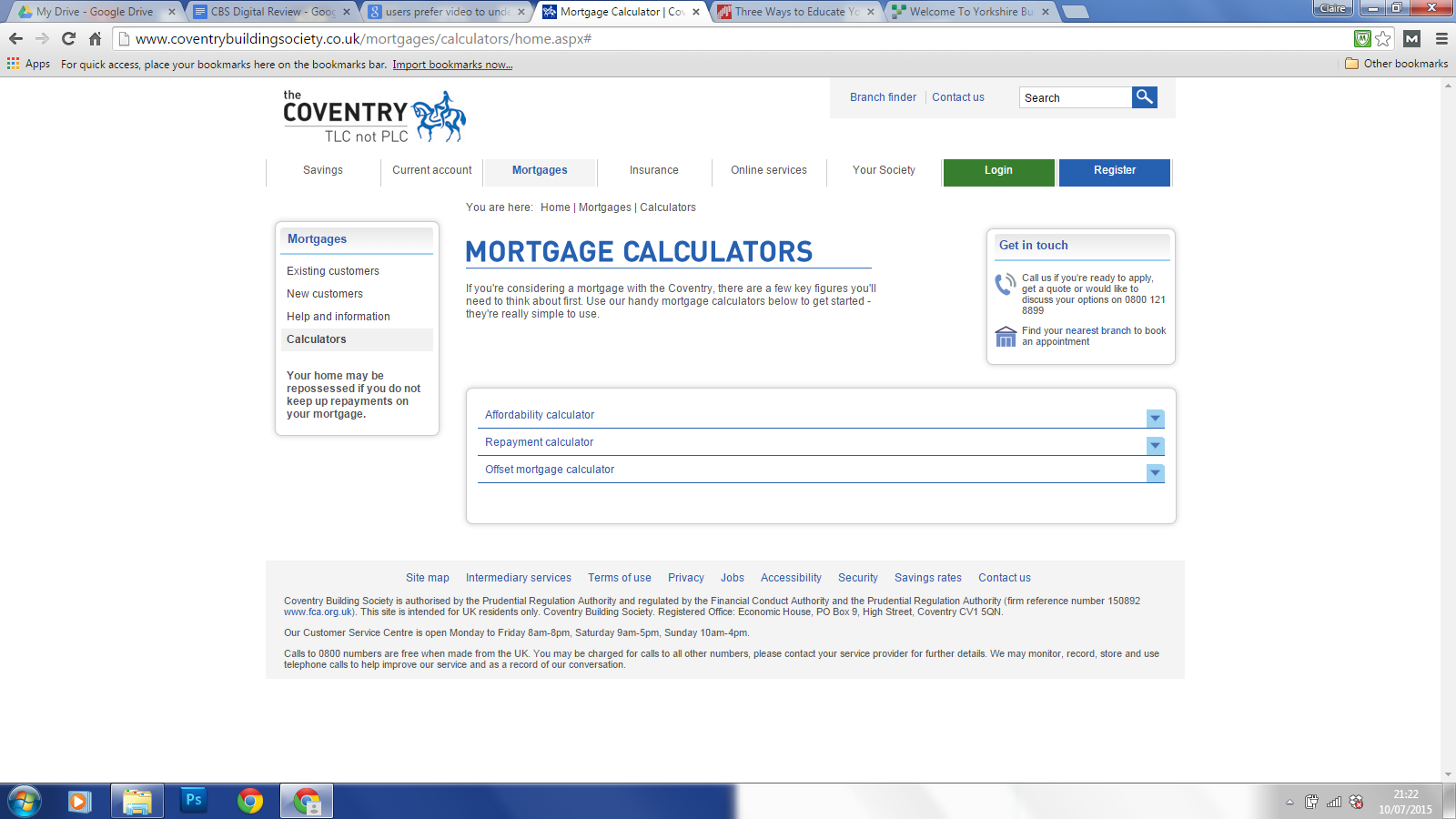
Kinaesthetic learners gain understanding by doing, and will prefer interactive online tools such as comparison charts and calculators to help them make purchasing decisions - as seen on the Coventry Building Society website:


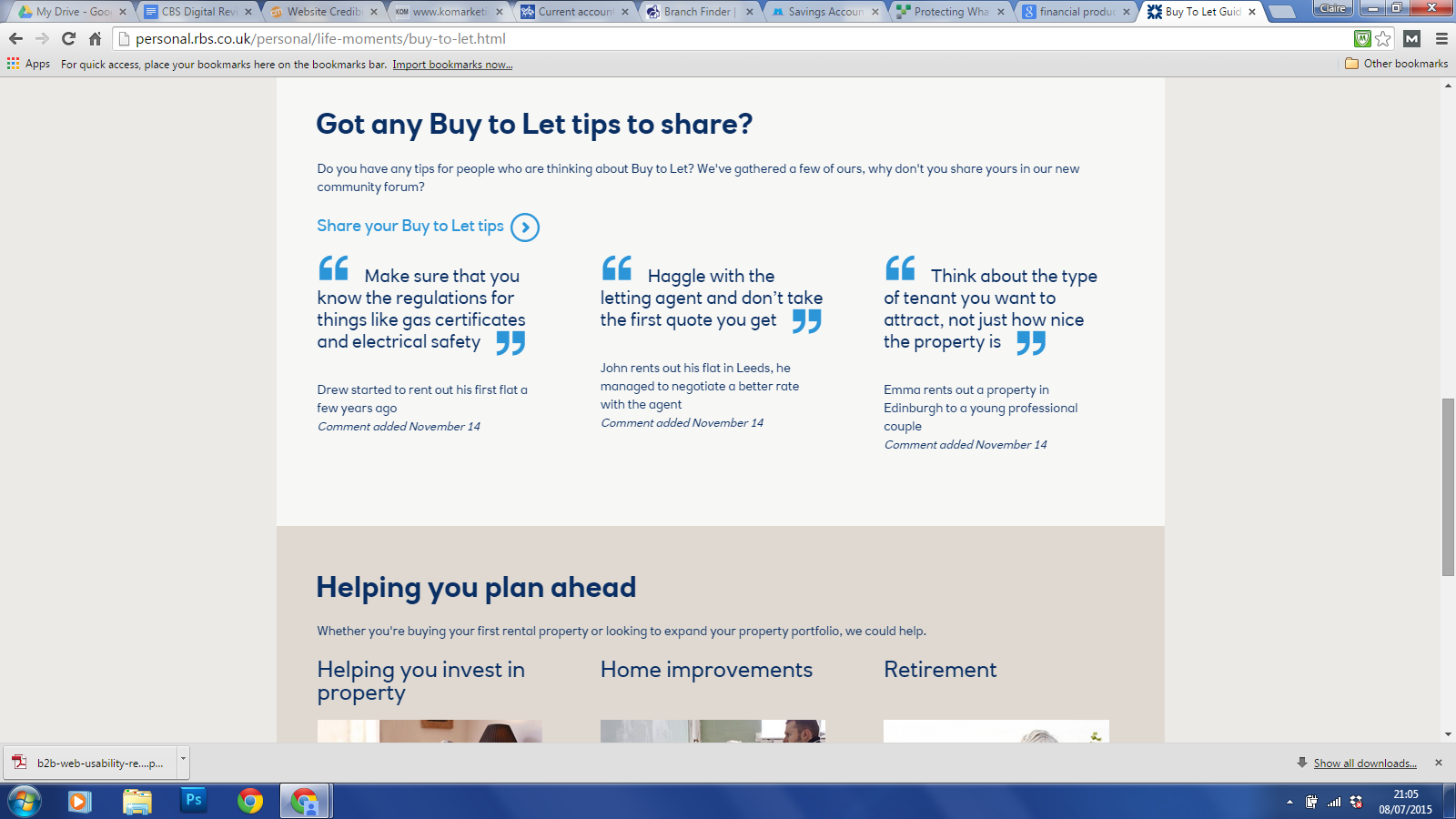
Social / emotional learners like to make decisions following discussion with their peers. They will respond well to online communities or live chat facilities. Royal Bank of Scotland have provided a forum where users can share tips and insights with each other regarding the management of finances and investments:


Metacognitive learners like to reflect on a range of information and will seek out knowledge from a range of thought leaders in order to make decisions. These customers are likely to access a number of blogs offering deeper insight into specific issues (for example through white papers and eGuides) before making purchasing decisions.


Remember:

  • Consumers conduct extensive research before making important buying decisions.
  • Content marketing has an important role in educating your audience.
  • People learn in a range of different ways.
  • Content can be re-purposed to cater for a range of learning styles.

About the author
Claire Cresswell-Lane is a UK based, CIM Chartered Marketer specialising in digital marketing strategy and communications. You can contact her via LinkedIn or Twitter.

Tuesday, 30 June 2015

11 essential items to include in a content brief

When creating content it is often necessary to employing the skills of a third party writer, for example, to access specific technical expertise or gain specialist insight that you don't possess in-house.

Providing a detailed and accurate writers brief is essential in ensuring the content returned is as close to the desired end result as possible.

11 essential items to include in a content brief [Share on Twitter]

1. Audience profile
Provide details about the intended audience. Give information about their demographic make-up; likes and dislikes; level of existing knowledge regarding the subject areas to be covered, and so on. 

Understanding the profile of the target audience will give the writer the best possible insight into the appropriate use of historical and cultural references to use to illustrate their content. It will also affect the tone of voice selected for the piece.


2. Key messages to be delivered
Consumers of digital content are time poor. If your audience reads one paragraph of your content, which key message needs to be delivered above all others? [click to Tweet]

Providing such guidance to writers will help to ensure accurate placement of content (above the scroll; in H1, H2 headers; meta descriptions, and so on).

3. Narrative
It is likely that the content being created forms part of a wider narrative and is one of many touch points that the reader will have with your brand.

Clearly explain to the writer which materials the target audience is likely to have accessed before, and content that will follow.


4. Tone of voice
If your brand guidelines don't already contain guidance, consider providing the author with a tone of voice document which details where the content should be positioned along a number of continuum’s: 

  • serious/fun
  • authoritative/insightful
  • contemporary/modern
  • formal/relaxed, and so on.

5. Takeaway messages
Be explicit about what the takeaway messages of the content should be. Describe how the reader should feel after accessing the content, and the key points they should be able to recall. [click to Tweet]

6. Word count / article length
It sounds obvious, but be clear on the required content length. Too many words may lead to heavy editing which affects the narrative. Too few words and the content may fall short of achieving its objectives.

If you are asking writers to provide titles, meta descriptions, email subject lines, and so on, remember to be prescriptive with character limits, to help ensure your digital content is fully optimised for the platform used. 


7. Content format 
Be clear about the format the content being produced will take (blog post, slideshare, infographic, email, eGuide and so on). This will have a significant impact on the writing style used. Where possible, provide examples of existing content in the same format.

8. Keywords
Provide the writer with details of the keywords and phrases that the content needs to include. State where these keywords should to be place within the copy, and the density of use. 

9. Trusted sources of background information
Provide links to any sources of information you have that will help them understand the subject area in greater detail.

This should not be a replacement for the desk research that they conduct themselves, but simply provides examples of trusted sources of credible information.

10. Deadline!
Provide clarity on the deadline for content to be completed. Where necessary, indicate the number of amends cycles that are likely to be required. This will help writers to plan their time effectively in order to deliver on time.


11. Publication date and place
Many copywriters like to provide links to the content they have helped to create on their own websites and blogs. It's a great opportunity to get an all important back link or two!

What are your must include items?

Monday, 29 December 2014

Mobile optimisation - make it easy for visitors to do business with you

Updates to Google's algorithm in April 2015 mean that optimising for mobile is no longer an option, but a necessity:

"Starting April 21, we will be expanding our use of mobile-friendliness as a ranking signal. This change will affect mobile searches in all languages worldwide and will have a significant impact in our search results. Consequently, users will find it easier to get relevant, high quality search results that are optimized for their devices. "


What to consider when optimising for mobile


One key element to mobile optimisation is surfacing the transactional elements of your website - the features that enable users to do business with you. Let's look at an example from courier company TNT.

TNT's recently optimised design allows visitors to conduct 5 actions straight from the homepage (get a quote, track a package, search, log-in, and browse the site structure via a drop-down menu), and a further two within a single click (register, and leave feedback):


Even on mobile devices where space is at a premium, 3 main actions can be carried out via the optimised site:


This is a vast improvement on the previous TNT design - although this desktop design renders correctly on mobile devices, calls to action for the end user are not immediately obvious:

Deciding which actions to optimise

Decisions you make about changes to your online presence should always be based on solid evidence. This can be obtained from a number of primary and secondary sources such as Google Analytics; user experience testing; online ratings and reviews; social media analysis; current best practice guidelines, and so on.

Search is key

Search is a key feature for mobile users - they are much less likely to try to navigate your site because text is harder to read and buttons harder to select on limited screen space. Ensure that your search results are optimised to return the best results for your top transactional features.


About the author
Claire Cresswell-Lane is a UK based, CIM Chartered Marketer specialising in digital marketing strategy and communications. You can contact her via LinkedIn or Twitter.

Friday, 26 September 2014

5 Facebook Tactics to Increase Engagement

I recently attended a Facebook Master Class, run by Social Media Advance. Here, I share the top 5 tactics I took away from the course.

1. A (cover) picture is worth a thousand words

When the average user logs on to Facebook there are 1,500 potential updates could feature in their newsfeed. Facebook therefore serves what it judges to be the posts that will be of most value and interest. These are posts from individuals, pages, and groups that the user interacts with most frequently. If you are at the stage of trying to building an audience this can pose a particular challenge – only 5% of your posts are likely to appear in followers newsfeeds organically.

One tactic to overcome this is to update your cover photo regularly - as notification that you have done so always appears in news feeds of your followers. This provides a touch point between your brand and your audience, reminding them of your presence and increasing the likelihood of engagement.

Beware not to use cover photos in place of posts. No more than 20% of your cover photograph can be text - Facebook have a text overlay detection tool to help you stay compliant.

Updating your cover photo too frequently could also prove a turn-off for your followers, so use this tactic sparingly.

2. Pinned posts

If there is a message that you want to remain at the top of your Facebook page, you can pin it by hovering over the drop-down arrow in the top, left-hand corner of the post. Pinned posts automatically stay at the top of your page for 7 days – increasing exposure for important messages.

3. Less is more

Posts of up to 80 characters get 27% more engagement so keep them brief to encourage comments, likes, and shares.


4. Full length URLs

Posts with links detailing a full length URL generate 3 times more engagement as users trust the destination site as a trusted source. Keep  shortened URLs for platforms with character limits - such as Twitter.

5. Ask and you shall receive

Posts asking for likes, comments, and shares gets 30% more engagement, so design your messages in a way that encourages interaction.

On that note, if you have found these tips useful, please 'say thank you' with a share, follow (Twitter), or like (Facebook).

Friday, 12 September 2014

Tips for structuring website content

When reading information from a screen, people do not start in the top left of the page and read every word. So what do they read and how can you make sure you get your key messages across?

Place keywords on the left

Special equipment can be used to detect exactly where people's eyes are focused when they look at a computer screen. This form of usability research makes it easier to understand what part of website design users are attracted to, and which parts they tend to overlook. 

A study involving 232 people found that website users spend 69% of their time viewing the left half of the page (regardless of the layout). Their eyes scan the page in an F pattern.

Follow the F pattern

If you focus on the red areas of the pictures below, you will see what is known as the F shape - this is where users tend to focus their attention when scanning a website. 


Source www.useit.com

·        The first two paragraphs must state the most important information. This is the most likely to be read.

·      Start subheads, paragraphs, and bullet points with information-carrying words that users will notice when scanning down the left side of your content in the final stem of their F-behaviour.

In summary

 Users won't read your text thoroughly in a word-by-word manner - especially when conducting initial research. People are scanning content headings, sub headings and opening paragraphs for keywords to decide if the webpage they have opened is what they are looking for. If it isn’t, they will hit the back button in their browser and open the next search result listing!

Do you think these rules apply to websites optimised for mobile? Please add your comments.

Friday, 22 August 2014

Developing an effective SEO strategy


With so many online channels for the modern marketer to manage (websites, blog, social media channels, and so on) it can be difficult to know where to focus efforts in order to create an efficient SEO strategy. Here are 10 tactics that contribute to effective digital growth.

 Organic website traffic


1.  Increase organic traffic. Organic traffic proves that your content is relevant and current to your users’ needs, adding credibility to your website when it come to search engine rankings. To increase organic traffic, write content that is: 


·         easy for search engines to index


·         relevant to search queries of your target audience(s)


·         engaging and original


·         easy to share.

Return visitors

2.   Increased visitor loyalty. In order to realise the lifetime value of customers, you need to facilitate repeat visits to your digital channels. Visitor loyalty will stem from a good initial online experience where: 


·      relevant information is easy to find


·      queries are resolved first time: through FAQs, online support, or via user forums


·      content is personalised to the individual (via links to CRM, cookies, or account preferences)


·      service is above and beyond that expected.

Resolve queries online

3. By resolve queries online you can reduce: 


·     costs to the organisation (cheaper than handling calls via a contact centre)


·     customer frustration (faster than waiting in a telephone queue).

Reinforce your brand off-line

4.   You can reinforce your brand when customers are offline by providing downloadable content. Remember to:  


·     add genuine value – provide free information and special offers


·     provide easy routes back to your online channels (via tagged URLS).

Data capture

5.       Form completion. 


Whether it’s subscribing to a newsletter, providing feedback, or signing up to an online forum – capturing information via form completion can: 


·         inform your CRM strategy


·         help you to segment and target audiences


·         gain valuable customer insight about your services


·         encourage future touch points with your brand.

Be social

6.       Encourage social shares.


Word of mouth is a powerful and trusted channel. People are more likely to interact with a brand that is recommended by a friend or family member.  Make your content easy to share (via Twitter, Facebook, and so on) and comment on. Amplify compliments via your contacts networks. Minimise reputation damage in the same way. 

Offer incentives

7.       Competition time! 


Competitions are a great way to increase BUZZ, raise brand awareness, and engage customers old and new – which all boosts your SEO efforts.  If you are running a competition via Twitter, here are some simple rules to help you.

Online sales

8.     Sell your products and services online. Increasing revenue is the bottom line! Make it easy for your visitors to buy online by: 


·         providing clear calls to action


·         remember personal preferences


·         offering one-click ordering


·         allowing order tracking


·         reassuring that transactions are secure!

Cross-channel promotion

9.       Promote new channels.


Promote channels that your existing customers may not have tried before, to increase the touch points they have with your brand:


·         Follow us, like us, poke us, +1 us, and so on.


·         Encourage sign-up for off-line promotions.


·         Run targeted ad campaigns.

Accessibility is key

10.   Make content accessible. 


You can have the best content, the fanciest CRM system, and the most engaging graphics out there, but if your customers can’t access your channels, they will not serve you well: 


·         Invest in mobile optimisation.


·         Comply with W3C standards for accessibility.


·         Have a business continuity strategy so if one channel fails, others can step in!

About the author
Claire Cresswell-Lane is a UK based, CIM Chartered Marketer specialising in digital marketing strategy and communications. You can contact her via LinkedIn or Twitter.


Monday, 18 August 2014

How to win the social media debate

Sometimes, the most challenging part of setting-up social media accounts is convincing your senior colleagues that it is a good idea! Here are some tactics to help you out...

The conversation is already happening

People are already talking about your brand and or activities online – but if you're not actively monitoring social media, you just don't know it, or if it is correct. There are lots of tools, both free and paid for, to help you monitor your reputation online. See what is being said, and make sure decision makers are aware of the frequency and tone of these conversations. Demonstrate the opportunities being missed.

Inform future communications efforts

By monitoring conversations that others are having online, you can understand how effective your communications have been to date – how well your key messages have been delivered and understood; where you need to correct or reinforce information, and so on.

Stakeholder database analysis

Analysing stakeholder databases can be a very powerful tool for convincing colleagues that social media is a must-do. Make a list of your top stakeholders, then simply list their social media presence and level of activity. Once you have identified where your stakeholders are present online, see how they are already interacting with each other. Mentionmapp.com is a free tool, that quickly provides you with a visual representation of who your stakeholders are talking to, and about which topics (you need to sign in with a Twitter account).

Make your content shareable

Making your website content easy for your audiences to share can help to demonstrate how actively they are participating in social media. There are lots of free tools around, such as addthis.com which you can include on website pages, in email footers, newsletters and press releases. These tools have reporting systems that let you see how many times content has been shared, and accessed as a result of those shares.

This will demonstrate two points: 1) your current audience is actively using social media and 2) social media can be a powerful way of amplifying your messages and extending audience reach.

Adding statistics like this to your monthly reports will serve as a passive reminder that social media should be on the agenda.

Ask your audience

Asking your target audience(s) about their social media use can be a powerful tool to convince colleagues that social media is no longer a nice-to-do. This could be something simple, like an online poll, or a questionnaire created in Survey Monkey, which is free to use.

Referrals from social media channels

Free tools such as Google Analytics can tell you all sorts of useful information to help with your arguments for developing social media channels, such as: number of referrals to your website via social media channels and the number of visitors accessing your site via a smart device.

Brand identity

Social media accounts are an important part of brand identity. If you do not claim your accounts, somebody else may do it for you in order to capitalise on your brand, or even to try to sell it to you at a later date (this is known as cyber-squatting).

Search Engine rankings

Having your website appear on the first page of Google is no longer simply about keyword placement, or how much you are willing to pay for an ad-placement. Google look at over 200 factors to determine whether they should return your website content to users who search for given phrases. Social media activity now plays an important role in determining your credibility as a trusted online source – social accounts linked to your domain; frequency of new content posted; number of quality followers/subscribers, click-through-rate, and so on.

Managing the risks

Resistance to using social media can stem from the perceived or actual risk associated with doing so:
  • Creating a demand for services that there is not capacity to manage.
  • Negative comments online about the brand, organisation, or individuals.
  • Passwords being lost, shared, or accounts being hacked.
  • Employees making defamatory remarks online – accidentally or intentionally.
  • Security and governance concerns over data being held by third parties such as Twitter, or Facebook.
  • Retaining ownership of online collateral, and so on.....
These risks are all real, and it is important to address them in order to provide reassurance about how they will be managed. Your social media policy should outline known risks to the organisation, and the methods you will use to mitigate them. It is important that the written policy is well communicated and understood by individual employees before any social media activity takes place. Here are some pointers to get you started with developing a social media policy.

Pilot projects

Rather than go for a big-bang approach to social media, you may want to start with one account and make sure you manage it as well as possible. Ensuring its success will be the best way to convince colleagues of the value of future social media use.

It can be useful to identify a specific project with a clear start and end date, and trial the use of social media as a communications channel for this. This is helpful because it legitimately allows the organisation to close the account after a fixed period of time. This means that if some of the risks identified above are realised, the social media account can be taken off-line after a short period of time without further risk to reputation.

Pilot projects also allow social media managers to gain all important hands-on experience, both in terms of dealing with the platform, and the types of responses received.

Need help with social media?

If you have any questions, post them in the comments below and I will do my best to help you out.

If you have found this article useful, please show thanks with a share, follow, or like.